
QR code phishing—known as quishing—is becoming one of the fastest-growing cyber threats. By hiding malicious links inside QR codes, attackers can bypass traditional email security and trick users into visiting fake websites on their smartphones. Microsoft reported a 146% increase in QR code phishing attacks during the first quarter of 2026. Here’s how these scams work, what to watch for, and how to protect your business.
QR codes have become part of everyday life. We use them to pay for parking, view restaurant menus, connect to Wi-Fi, and open shared documents.
Unfortunately, cybercriminals have noticed too.
Instead of sending a suspicious-looking web link, attackers now hide malicious websites inside QR codes. Because the link is stored within an image rather than plain text, many traditional email security tools can’t inspect it properly. Even worse, scanning the code usually opens the website on your smartphone, taking you outside the protection your work computer normally provides.
Here’s what every business should know about QR code scams, why they’re becoming more common, and how to avoid becoming the next victim.
What Is a QR Code Scam?
A QR code scam—often called quishing—is simply phishing delivered through a QR code.
Rather than asking you to click a link, the attacker asks you to scan a QR code. Once scanned, it opens a fraudulent website designed to steal your Microsoft 365 login, banking details, payment information, or other sensitive data.
The fake website itself isn’t new—the QR code is simply a clever way of getting you there.
Why Are QR Code Scams So Effective?
There are two main reasons.
The malicious link is hidden inside an image
Traditional email filters are excellent at analysing written links.
A QR code, however, is simply an image. Unless your security solution specifically scans images for embedded QR codes, the malicious website can slip through unnoticed.
This is one reason the UK’s National Cyber Security Centre (NCSC) has warned organisations about the growing use of QR codes in phishing attacks.
You switch from your work PC to your phone
Most businesses invest in protecting company computers with:
- Web filtering
- Endpoint security
- DNS filtering
- Threat detection
Your personal mobile phone often has far fewer protections.
By encouraging you to scan a QR code, attackers move you from your secured work environment onto a less-protected personal device—exactly where they want you.
QR Code Phishing Is Growing Fast
Quishing is no longer an unusual attack.
According to Microsoft’s email threat intelligence for Q1 2026:
- QR code phishing attacks increased by 146% during the quarter.
- Attacks rose from 7.6 million in January to 18.7 million in March.
- Most malicious QR codes arrived inside PDF attachments, making them appear to be perfectly legitimate business documents.
This rapid growth shows attackers are finding QR codes increasingly effective.
Common QR Code Scams
Here are some of the most common examples businesses are seeing today.
- Fake Microsoft security alerts: An email claims your Microsoft 365 account needs verification or your multi-factor authentication (MFA) must be reactivated. Instead of clicking a link, you’re instructed to scan a QR code—which opens a fake Microsoft login page.
- Shared documents: You receive an email saying a colleague or client has shared a document. The QR code supposedly opens the file, but instead directs you to a fake sign-in page.
- Invoice payment requests: A PDF invoice includes a QR code labelled “Pay Now” or “Quick Payment.” Scanning it sends your payment directly to the scammer.
- Delivery notifications: Text messages and emails claiming you’ve missed a parcel often include QR codes to “reschedule delivery.” The US Federal Trade Commission (FTC) has warned consumers about this exact scam.
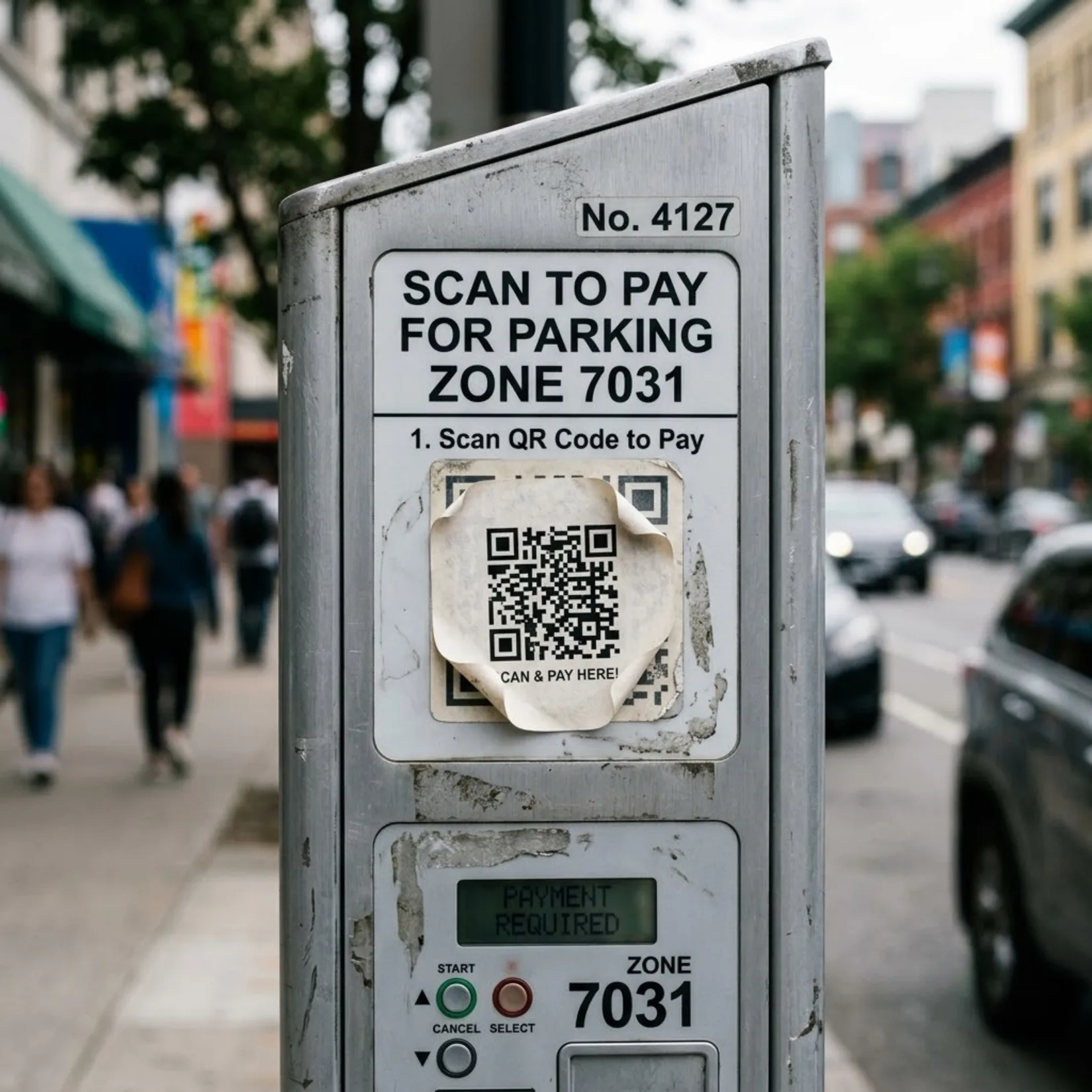
- Fake public QR codes: Not every scam starts online. Fraudsters have been known to place QR code stickers over legitimate ones on parking meters, posters and payment terminals. What looks like an official payment page could actually belong to a criminal.
How to Protect Your Business
Fortunately, avoiding QR code scams is mostly about building good habits.
- Be cautious of QR codes in emails: If an email asks you to scan a QR code to log in, verify your account or make a payment, treat it with the same suspicion as any unexpected link.
- Check the destination first: Most phones show the web address before opening it. Take a moment to read it carefully. If the website doesn’t match the organisation you expected, don’t continue.
- Visit websites yourself: If Microsoft, your bank or another supplier says action is required, open your browser and type the address manually or use a trusted bookmark instead of scanning the code.
- Don’t let urgency pressure you: Messages threatening account suspension, missed deliveries or overdue payments are designed to rush you into acting before thinking. Pause and verify first.
- Use phishing-resistant MFA: Passkeys, hardware security keys and modern authentication methods make stolen passwords far less useful to attackers.
- Check physical QR codes: If you’re scanning a QR code on a parking machine or payment terminal, look carefully for stickers placed over the original code.
- Educate your team: Many people still haven’t heard of quishing. Sharing real examples with employees can significantly reduce the chances of someone falling for one.
What If Someone Has Already Scanned One?
If someone in your business scanned a suspicious QR code and entered their details:
- Change the affected password immediately.
- Update any other accounts using the same password.
- Ensure MFA is enabled.
- Contact your IT provider so they can review login activity.
- If payment or banking details were entered, contact your bank immediately.
The quicker you act, the more likely you are to minimise the damage.
Stay One Step Ahead
QR codes aren’t dangerous on their own—but like any technology, they can be abused.
Teaching staff to treat QR codes with the same caution they would an unexpected email link can significantly reduce your risk. Combined with modern authentication and security awareness training, a little vigilance goes a long way in keeping your business protected. Contact us today to find out how we can help train you and your team.
Article used with permission from The Technology Press.
Comments are closed